Why does my app say biosensor reconnecting?
Biosensor reconnecting: Your smartphone has temporarily stopped receiving readings from Bluetooth. You won’t get readings until fixed. When your biosensor readings resume, up to 24 hours of missed readings can fill in on the trend graph.
This displays on your screen after a few minutes of not getting readings.
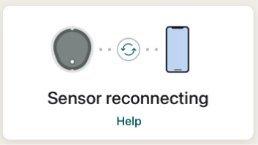
Troubleshooting tips:
- Turn Bluetooth off. Then turn it back on and leave it on.
- Keep the app open and displayed on your screen. Don’t swipe the app closed.
- Keep your smartphone within 20 feet of the biosensor with nothing between them, including your body, walls, and water.
- Keep your smartphone on the same side of your body as your biosensor. Bluetooth works best when the biosensor and smartphone are in sight of each other.
- If these solutions donʼt work, restart your smartphone and app.
To help prevent:
- Use recommended phone settings listed in the app at Settings > Phone Settings.
- Keep your smartphone battery charged to at least 20%.
If your biosensor does not reconnect after following these steps, go to SteloBot and report a product issue.
MAT-3807
Related articles
Why am I getting Signal Loss?
Stelo Biosensor Signal Loss is when your smartphone temporarily stops getting readings from your biosensor. Learn how to prevent and fix Signal Loss errors.
What does Stelo Sensor Failed alert mean?
You'll see Stelo Sensor Failed alert if you try to start a new biosensor session with a biosensor you've used before that has failed or expired. Learn more.
What does Brief Sensor Issue mean?
Brief Sensor issue means that your Stelo system detected that the biosensor can no longer determine your glucose reading. Learn how to fix it.
Why is my display device still “Searching for sensor” and not pairing?
Pairing your Stelo glucose biosensor with your phone or smart device usually takes less than 5 minutes. If it takes longer, try these troubleshooting tips.