How do I update my payment method and shipping address?
To update payment methods or addresses for a subscription, log in to your account through Stelo.com and navigate to the Subscriptions tab and select Manage subscription for the subscription you'd like to update.
- Under Next payment, click Change to update your payment method.
- Under Next shipment, click Change to update your shipping address.
Important:
- Updates must be made at least 2 days before the processing date to apply to that order. Changes made after this window will apply to future shipments.
- When updating your address, be sure to select it as your primary address to avoid issues with future or replacement orders.
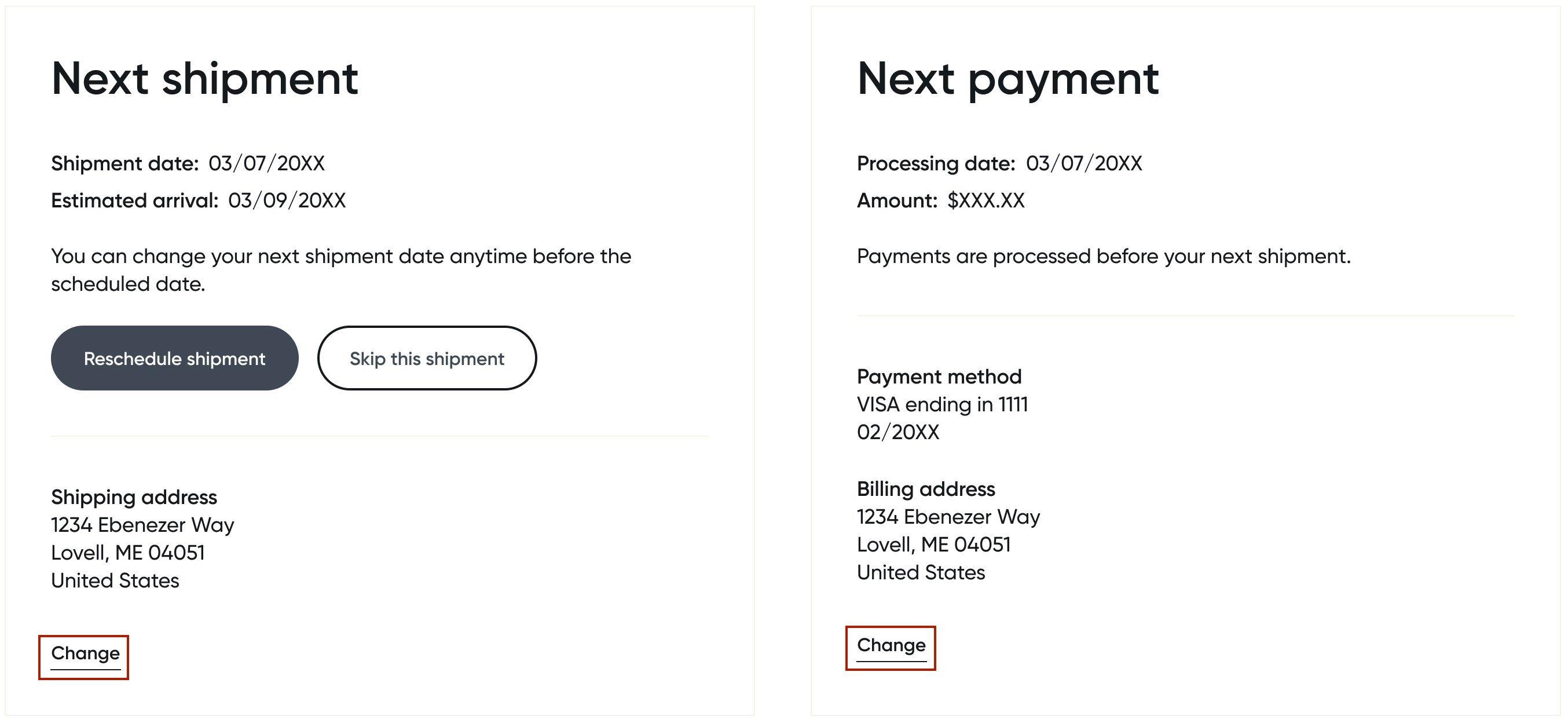
For general payment method and address updates:
Log in to your account through Stelo.com and navigate to the Payments or Addresses tab from the main account dashboard view.
MAT-4703
Related articles
How do I get a copy of my receipt/invoice?
Log in to your Stelo account, navigate to the orders tab from the main dashboard, then select the order you wish to receive an invoice for and download invoice.
Where is my Stelo order?
You can track the status of your Stelo order by entering your email address and order number on the Order Lookup page, or by logging into your account.